Credits
Credits are used for executions and other billable actions in QualityKeeper.
Open credits from the header
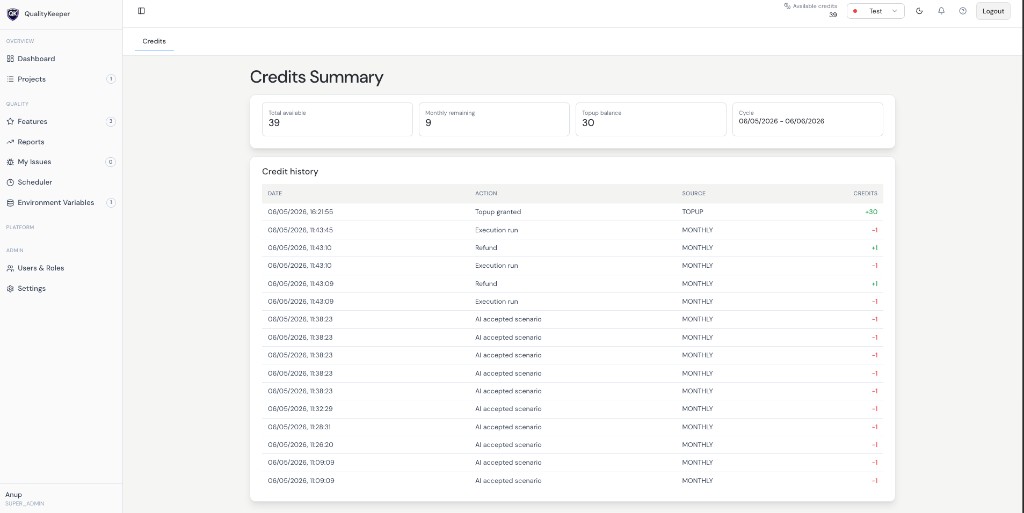
Click Available credits in the top header (next to the project selector). That opens the Credits view with a summary and full credit history (audit log).
Summary
At the top you typically see cards such as:
- Total available — credits you can spend now
- Monthly remaining — allocation left in the current monthly cycle (if applicable)
- Topup balance — credits from purchases or grants outside the monthly pool
- Cycle — current billing or allocation period (start and end dates)
Exact labels may match your organization’s plan.
Credit history (audit)
Credit history is a chronological log of every change to your balance. Rows usually include:
- Date / time
- Action — for example execution runs, refunds, AI usage, top-ups granted
- Source — such as monthly allocation versus top-up bucket
- Credits — positive amounts in green (+), negative in red (−)
Use this table to reconcile usage, troubleshoot unexpected draws, or confirm refunds and grants.
Related: Users & Roles · Settings